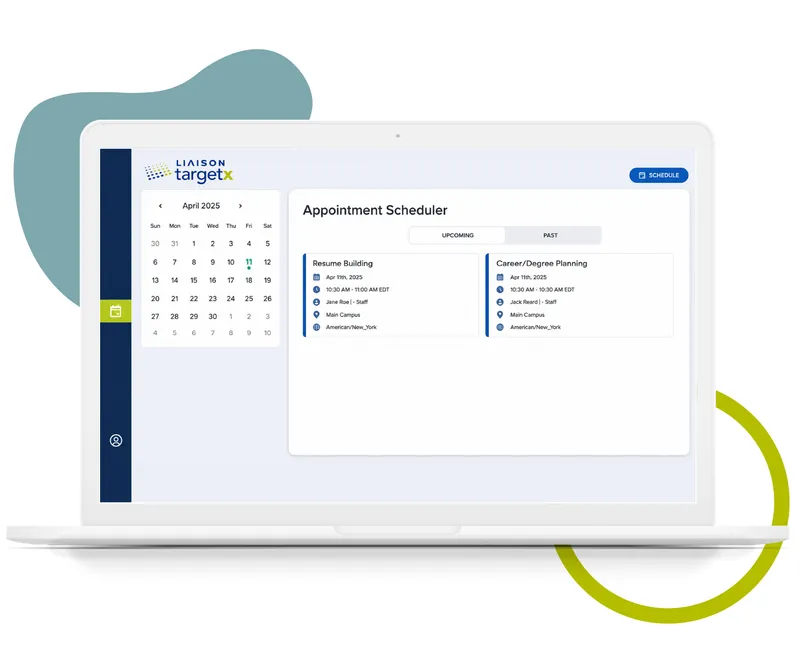
TX_TargetX_ApptScheduler_desktop

Student engagement

Lower the barriers to entry for students during the admissions process and convert more prospects into applications

Leverage tools that connect departments across campus to facilitate student success

Success Teams within the TargetX Retention CRM allow you to assign and manage a student’s support network all in one place, creating direct links between students and their academic and support connections across campus. This is crucial in promoting a student’s success at your institution because Success Teams enable the automation of alerts, reports, and critical information to the right people at the right time across campus.

Students using MyLiaison, career and education planning platform, sit on university steps reviewing materials.

Features to amplify your staff's efficiency

TX Forms are browser-based, mobile-responsive forms built and managed inside TargetX. Each form is tied to Salesforce objects like Leads, Contacts, or Events, making it easy to route data to the right records automatically.

Key Features:

- Drag-and-Drop Form Builder: Easily design forms without the need for any coding skills.

- Custom Field Mapping: Seamlessly integrate form fields with Salesforce for smooth data synchronization.

- Conditional Questions: Intelligently display or hide questions based on user responses.

- Editable Picklist Values: Customize or remove picklist options to meet your specific requirements.

- Conditional Picklist Values with Option Groups: Present only relevant picklist options based on defined criteria.

- True/False Questions: Streamline forms and ensure consistent data collection.

- Repeatable Sections: Enable users to input multiple sets of similar data within a single form.

- Display Text: Offer useful instructions or additional context within the form.

- Clone Existing Forms: Save time by duplicating and modifying previously created forms.

- Uploads – Allow users upload documents and files directly through the form.

- reCAPTCHA Support – Safeguard your forms against spam and automated submissions.

Use a TX Form when you need:

- A custom form hosted on your site or shared via a link.

- Seamless integration allowing data to flow directly into Salesforce.

- Flexible control over field visibility, defaults, or validations.

- The capability to monitor user interaction and engagement using hidden fields or campaign IDs.

Use Cases Include:

- Event Registration.

- General inquiry form.

- Interest-specific opt-in.

- Collecting information for applications, essays or related records.

The TargetX Events module makes it easy to build eye-catching events, manage attendees, automate communication plans specific to your event type, and measure your success.

Build the perfect event, from promotion to registration, without designers or IT.

Design eye-catching events like a pro and increase registration using our simple drag-and-drop editor. You can even build and promote events that contain sub-events or breakout sessions. Since 90% of today’s students are accessing the web via mobile, TargetX Events offers a mobile-first registration interface so students can sign up for any campus event from their smartphone without hassle. This also applies to off-campus events— using the location-based filtering tool, students can search, view, and register for events within their zip code or postal code.

Ditch the clipboard and highlighter— manage your attendees, your way.

With real-time attendance notifications and waitlist tracking, you’ll be able to properly allocate resources to your event ahead of time. Plus, TargetX Events attaches individual QR codes to attendees’ registration confirmation to streamline the check-in process on the day of your event. No WiFi at the event’s location? No problem! Offline check-in is also supported by our event management tool, so you can kiss the ol’ clipboard and highlighter goodbye for good.

Save time and deliver a personal touch by automating all of your event communications.

Send targeted communications to students that drive engagement from the moment they sign up for an event through follow up once the event has ended. You have the ability to create custom communication plans for each of your institution’s event types that include confirmation emails, reminder text messages, follow up surveys, and more.

Discover which events are working (and which aren’t) with robust event reporting.

Measure the success of your events in real time with attendee tracking, lead capture, and powerful analytics. In addition to the pre-configured event report templates provided, staff members can easily create their own reports, dashboards, and filter views to determine the ROI of campus events. Spot trends and identify which events move the needle for students based on actual data, rather than guesswork, so you can fine-tune your event strategy or try something completely new.

TargetX Engage facilitates the management of "walk-in" meetings at different locations across campus. Administrators can configure meeting rooms along with available damation messages and view their place on the waiting list. Advisors can easily manage their Engage meetings, take notes, and maintain a history of student meetings.

TargetX Engage has the following features:

- The Advisor Center (available via the Engage tab) displays the Rooms available for advising meetings. From here, you log in to view/edit Room Settings, add students to the queue, or view the current waiting list.

- Multiple Engage rooms can be created for different meeting reasons and used simultaneously depending on your business needs. For example, you might have a room for the Registrar's Office, with reasons like "Add/Drop classes" or "Change Major," and another room for Career Development with reasons like "Resume Review" or "Practice Interview." You can also define Hours of

Operation and specific locations for each room.

- The Check-in window is used to check in students, allowing the selection of an advisor and a reason for the meeting.

- The Kiosk/Waiting list is displayed in your reception area/waiting room so students can see their placement in the queue. When an advisor has "picked up" a meeting, the student's listing will display as "Ready." Once a session is started, the student is removed from the waiting list.

- The Advisor Room Queue is what advisors see when they log in to a specific room. From this view, they can add students, prioritize the list, and "pick up" their next meeting.

- Administrators can also set up an Engage site to facilitate an online appointment scheduling queue that allows students to sign up for Engage appointments from home unauthenticated.

- Review the Engage Staff Experience video and Engage Student Experience video to learn how to utilize the tool for both your staff and students.

- Advisors can add multiple students to an Engage meeting to create and manage group sessions.

The TargetX Portal is a mobile-first interface that’s easy to build and personalize, while being flexible enough to grow and change with students throughout the lifecycle. Mobile-first, dynamic experience that can change with students throughout the lifecycle.

The TargetX Portal allows you to create dynamic, personalized portal experiences for students at any stage of the constituent lifecycle. Portals can be created for prospective students, applicants, current students, and any other constituency managed within the CRM including, but not limited to parents, guidance counselors, and more. Providing portal content that’s based on a student’s unique interests from data collected within the CRM is a game changer for institutions looking to enhance the student experience and foster meaningful relationships. Best of all, the TargetX Portal is built 100% mobile-first, supporting a seamless, modern experience across all devices. Drag and drop your way to beautiful, eye-catching portals— without designers or IT.

Easily create professional-looking portals by dragging and dropping any field (or combination of fields) into our Portal Builder. Make your portal stand out by adding images, embedded video, or dedicated widgets for application status, requirements checklist management, and event management. You even have the ability to add multiple pages to a portal for even more personalization. There’s no need for knowledge of HTML code so you can build a great portal experience for students without designers or help from IT— saving precious time and resources.

TargetX’s email platform allows you to easily create dynamic email templates, hyper-segment your audience, automate communication flows, and optimize campaigns with real-time analytics.

Drag and drop your way to branded, mobile-friendly emails without designers or IT

Design eye-catching emails like a pro using our simple drag and drop editor. Customize email template layouts, add calls-to-action, drop in images, and even change colors to match your institution’s unique branding guidelines. Then, put your design to the test by previewing your email across multiple devices on your own— no need for designers or developers.

Segment your audience to add the level of personalization that students expect

Increase open rates and click-throughs with segmented communications that make students feel like more than just another {{first name}} merge field. Configure email campaigns using powerful audience segmentation based on almost any field or data point on a student’s record within the CRM. Leverage custom merge fields and conditional content blocks to insert individualized information such as application status or remaining checklist items for a more personal touch.

Automate email campaigns to consistently deliver the right message at the right time

Drive more conversions with less effort by fueling prospect nurturing efforts with robust email campaign automation. Build workflows based on specific enrollment criteria to send the right email at the right time for enhanced student engagement. For instance, you can easily create a workflow that automatically adds students to an applicant conversion drip campaign once they click the “Apply Now!” call to action within your admissions marketing email.

Discover what’s working (and what’s not) with built-in, real-time email analytics

Optimize email marketing campaigns with detailed engagement analytics. TargetX Email Campaign Intelligence Reports track open rates, click-throughs, precise links accessed at the recipient level, bounce rates and opt-outs. These metrics help you identify what your audience really cares about based on actual data, rather than guesswork, so you can adjust your strategy accordingly or try something completely new.

Expand your reach with TargetX

emails sent per year

SMS sent per year

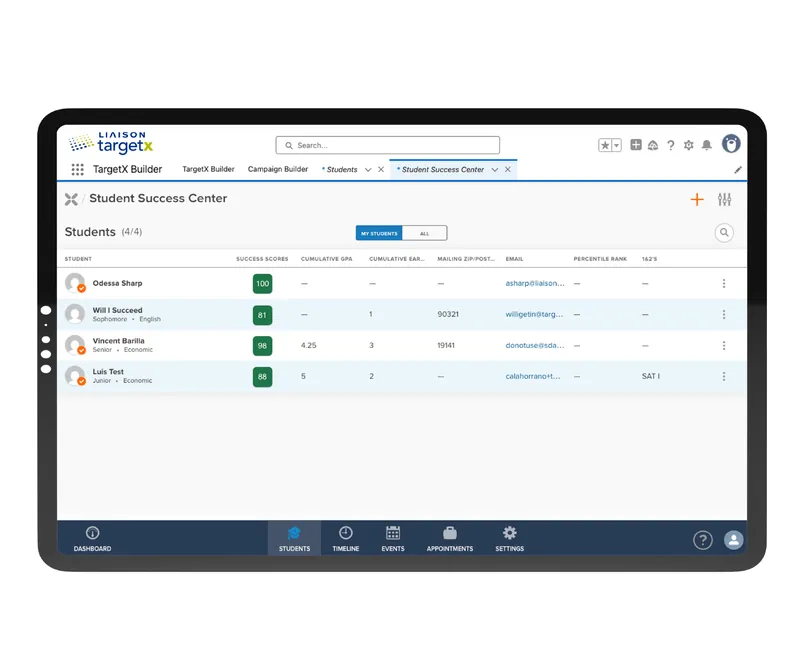
TargetX Student Success Center

The TargetX Student Success Center is your personal “mission control” to manage current students, providing a comprehensive view of all retention initiatives on campus. Using this robust dashboard helps counselors quickly identify which students need additional help and which students are persisting.

Student success dashboard with tasks, students and appointments overview

Other TargetX solutions

Recruitment and admissions

Attract your ideal students and streamline the admissions process with our mobile-first applications, personalized student portal, and custom communication tools.

Marketing and communications

Make a student’s experience with your institution memorable both online and in person to increase their likelihood of making your school their first choice.

Insights and reporting

Make informed decisions with powerful analytics that provide insights across recruitment, admissions, and student engagement.

TargetX FAQs

TargetX is a proud partner of Salesforce, and all TargetX CRM solutions are certified EDA core compatible. Salesforce supports higher education and nonprofits as the #1 CRM platform in the world. Visit the Salesforce AppExchange to find a community of partners that can further enhance your TargetX CRM and the student experience!

TargetX institutions have bi-directional integrations with student information systems including Banner, Colleague, PeopleSoft, PowerCampus, Jenzabar, and even homegrown or mainframe systems. TargetX also integrates with data management providers like Axiom to validate data accuracy, prevent duplicate records, and increase productivity.

TargetX integrates with common higher ed payment gateways like PayPal, TouchNet, Elavon, HigherOne/CASHNet, Nelnet, CyberSource, ACI/OPC, and many more. All payments collected through your preferred payment gateway are automatically recorded on the student record in the CRM.

TargetX provides functionality to directly load data and documents from online applications like the Common Application (SDS), CAS applications like GMAC (LOR), and statewide application services like ApplyTexas into the CRM. Many institutions choose to adopt the TargetX Online Application in addition to their centralized application to support an improved student experience.

TargetX provides pre-built file imports and releases for test score providers, including SAT, ACT, TOEFL, GMAT, GRE, Advanced Placement, and many more. TargetX also supports direct integration with Parchment for transcript management and offers imports for various search/marketing data providers such as NRCCUA, SSS, and Cappex.